.png?width=100&height=35&name=Kiwa_2024_RGB%20(1).png)
The Documents tab is designed for high‑level review of completed documents. It displays the number of completed documents per target, the number of documents by target, and the number of documents over time. For a more detailed review of document contents, use the Categorization tab.
Below is an overview of the charts available on this tab. Note that filter selections can affect the content of the charts; this guide describes only the basic data shown.
Amount of Documents
The first pie chart on the tab lists all documents within the selected time range for the selected target. If the Select template filter contains tool selections, the pie chart will show the number of completed documents for those selected tools. Other filters can also be used to set conditions that determine which documents are included in the analytics.
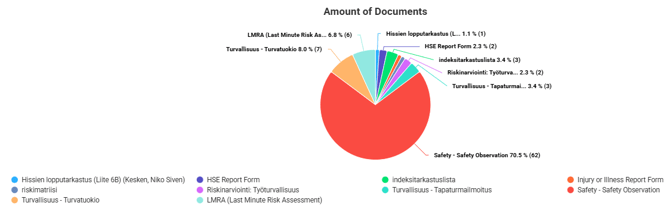
By clicking a specific tool’s segment in the pie chart, you can select that tool as a template filter
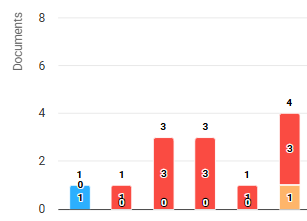
Amount of Documents by level
The next bar chart shows the selected documents by Level.
- The horizontal axis displays the levels.
- The vertical axis shows the number of documents
- The total number of documents for each levl is displayed above each bar
Each tool appears in the chart with its own color (colors remain consistent across all charts). Hovering over a segment reveals detailed information.
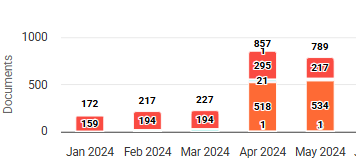
Amount of Documents Over Time
This chart shows the amount of documents over time, as the name suggests.
The Time filters—time unit and time range—significantly affect the data displayed.
The chart can be used to examine how documents have been completed for a specific target, for example on a daily or weekly basis.
Different tools are shown in different colors, and the total count for each time segment is displayed above the bars. More detailed information appears when hovering over a color segment.
Number of Documents Over Time, by Target
The final chart combines the information from the previous two charts.
It allows comparison of document counts over time across two or more targets.
Targets are color‑coded and displayed as separate segments within the bars.
Printing / Saving Charts
Charts can be exported from Analytics using the three-line menu in the top right corner of each chart. From the dropdown menu, you can open the chart in a new window or save it in your preferred format.