.png?width=100&height=35&name=Kiwa_2024_RGB%20(1).png)
In the Document table, you have ready-made quick selections that allow you to view data from different perspectives.
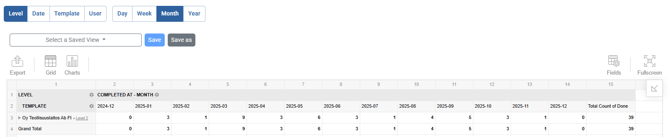
Target: View template completions by target
Date: View completed documents in relation to date
Template: View completed documents in relation to template
User: View completed documents in relation to reporter
Time: From the quick selection, you can also choose Day, Week, Month, or Year, according to which the documents are grouped by time.
Example of use: Have monthly inspections been completed in all levels?
- Select the start and end date of the period to be reviewed
- Select the levels to be monitored from the level filter
- Select the desired tool or tools
- Click Update to fetch the data into the table correctly.
Zero values are also shown in the table, so you can see in which target the inspection has not been performed. - Save the filter for the next time
The Level tab displays the data in a table, but you can also view the data by Date, Template, or User.
The table formatting must be configured separately for each tab, so remember to save your work in between.
You can always filter the data in the table using the values you want.
For example, on the User tab, you can click the gear icon next to the user cell and filter only the selected reporters into the list.